Hailey Morgan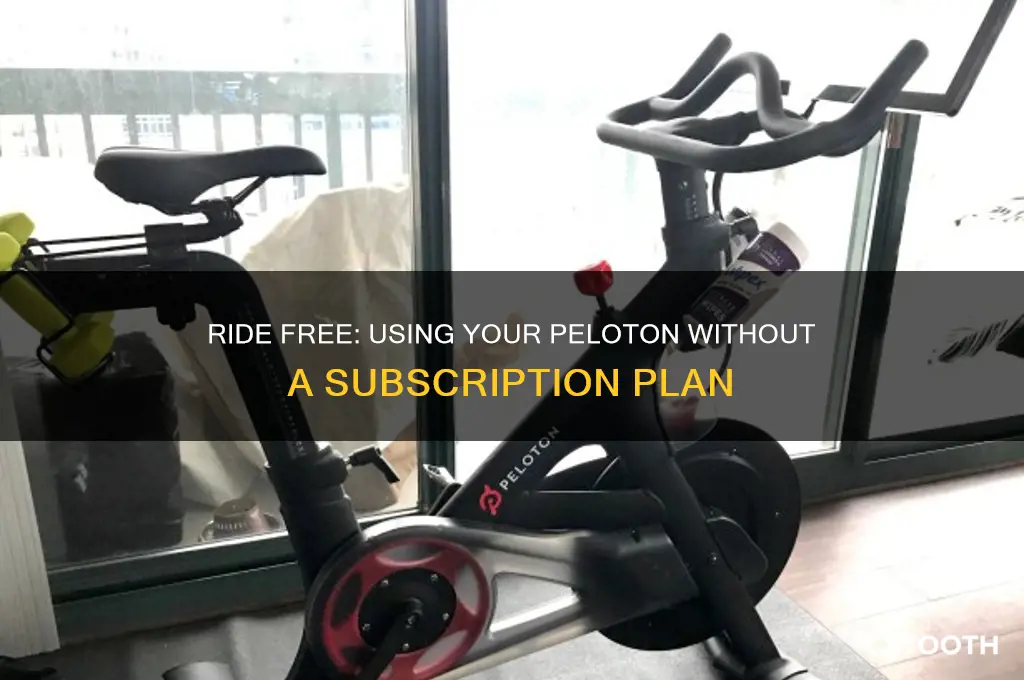
Using a Peloton without a subscription is entirely possible and can still offer a valuable workout experience. While the subscription provides access to live and on-demand classes, the bike itself has a Just Ride mode that allows you to manually control your workout, tracking metrics like cadence, resistance, and output. Additionally, you can pair the Peloton with third-party fitness apps or follow free online workout videos to guide your sessions. The built-in display can also be used to stream entertainment from platforms like Netflix or Spotify if you connect your own accounts. While you’ll miss out on the Peloton community and structured programs, the bike’s hardware and basic functionality remain fully usable, making it a flexible option for those who prefer a more independent approach to their workouts.
What You'll Learn
- Accessing Free Classes: Utilize the Just Ride feature for manual workouts without subscription-based guidance
- Guest User Mode: Create a guest profile to explore limited free content on the Peloton
- Offline Workouts: Download third-party apps or use YouTube for cycling routines without Peloton subscription
- Basic Metrics Tracking: Monitor cadence, resistance, and output manually during non-subscription rides
- Community Alternatives: Join free fitness forums or groups for motivation and workout ideas

Accessing Free Classes: Utilize the Just Ride feature for manual workouts without subscription-based guidance
Peloton’s Just Ride feature is a hidden gem for those looking to bypass the subscription while still leveraging the bike’s capabilities. Unlike guided classes, Just Ride allows you to manually control your workout, offering a stripped-down yet effective way to exercise. This feature is accessible directly from the bike’s touchscreen, requiring no subscription login. It’s ideal for users who prefer self-paced workouts or want to avoid recurring fees while still using their high-end equipment.
To start, simply select the Just Ride option from the Peloton home screen. The interface displays essential metrics like cadence, resistance, and output, but without instructor-led prompts. This setup is perfect for riders who already understand cycling fundamentals and want to focus on personal goals, such as endurance or interval training. For instance, you could set a 30-minute session with varying resistance levels to simulate hill climbs or sprints, all while tracking your progress in real time.
One practical tip is to pair Just Ride with external resources. Use free apps like Spotify or YouTube to stream music or follow along with non-Peloton cycling routines. Alternatively, create a playlist of motivational tracks or podcasts to keep you engaged during longer rides. This combination ensures you stay motivated without relying on subscription-based content. For safety, ensure the volume doesn’t drown out the bike’s feedback sounds, which are crucial for monitoring performance.
While Just Ride lacks the structure of guided classes, it offers flexibility for creative workouts. Experiment with time-based intervals (e.g., 1-minute high intensity followed by 2 minutes of recovery) or distance challenges (e.g., 10 miles at a steady pace). For beginners, start with 15-minute sessions and gradually increase duration as stamina improves. Advanced users can incorporate HIIT principles, alternating between all-out efforts and rest periods to maximize calorie burn and cardiovascular benefits.
The key takeaway is that Just Ride transforms the Peloton bike into a versatile tool, even without a subscription. It’s not just a fallback option—it’s a feature that empowers users to take control of their fitness journey. By combining it with external resources and structured planning, you can achieve meaningful results while saving on monthly fees. Whether you’re a seasoned cyclist or a newcomer, Just Ride proves that subscription-free workouts can be both effective and engaging.
Easy Biko Recipe: Cooking with Coconut Powder for Perfect Results
You may want to see also
Guest User Mode: Create a guest profile to explore limited free content on the Peloton
Peloton’s Guest User Mode is a hidden gem for those who want to test the waters without committing to a subscription. By creating a guest profile, you gain access to a curated selection of free content, including workouts, tutorials, and even some live classes. This mode is ideal for newcomers who want to experience the platform’s interface, instructor styles, and workout variety before deciding whether to invest in a full membership. It’s a no-strings-attached way to dip your toes into the Peloton ecosystem.
To activate Guest User Mode, start by powering on your Peloton device and navigating to the login screen. Instead of entering an existing account, look for the “Guest User” option, typically located at the bottom of the screen. Selecting this will prompt you to create a temporary profile. You’ll be asked to input a name (it doesn’t have to be your real one) and agree to the terms of use. Once set up, you’ll have immediate access to a limited library of free content, which often includes introductory rides, strength training sessions, and meditation classes. Keep in mind that progress tracking and personalized features won’t be available in this mode.
Comparatively, Guest User Mode offers a different experience than a full subscription but still provides significant value. While subscribers enjoy unlimited access to thousands of classes, personalized metrics, and community features, guest users get a taste of Peloton’s core offerings without the commitment. For instance, a guest might access a 10-minute beginner ride or a 5-minute stretching routine, perfect for quick sessions or trying out new workout types. This mode is particularly useful for households with multiple users who don’t all want a subscription but still want to use the device occasionally.
A practical tip for maximizing Guest User Mode is to explore the free content strategically. Start with classes that align with your fitness goals—whether it’s cycling, yoga, or strength training. Since the library is limited, focus on variety to get a well-rounded sense of what Peloton offers. Additionally, use this mode to familiarize yourself with the equipment and interface. For example, if you’re new to the Bike, try a few free rides to get comfortable with the resistance knob and cadence tracking before committing to a subscription.
In conclusion, Guest User Mode is a smart, risk-free way to experience Peloton’s platform. It’s not just about the free workouts—it’s about understanding whether Peloton aligns with your fitness needs and preferences. By creating a guest profile, you can make an informed decision about whether to upgrade to a subscription or simply enjoy the limited content as a supplementary fitness resource. It’s a win-win for both curious newcomers and budget-conscious users.
Mastering BIKE File Usage: A Comprehensive Step-by-Step Guide
You may want to see also
Offline Workouts: Download third-party apps or use YouTube for cycling routines without Peloton subscription
Peloton bikes are sleek, high-tech, and undeniably popular, but their subscription fees can be a deal-breaker for budget-conscious fitness enthusiasts. Fortunately, the bike itself is a robust piece of equipment that doesn’t require a subscription to function. By leveraging third-party apps and YouTube, you can create engaging and effective cycling workouts without the monthly cost. This approach not only saves money but also offers flexibility in choosing routines that align with your fitness goals.
To begin, download third-party cycling apps like Zwift, Rouvy, or FulGaz, which are compatible with Peloton bikes via Bluetooth or ANT+ connectivity. These apps provide immersive virtual rides through scenic landscapes or structured training programs. For instance, Zwift’s social platform allows you to ride with others globally, adding a competitive edge to your workout. Rouvy, on the other hand, offers augmented reality routes filmed in real-world locations. Ensure your Peloton bike is set to "Just Ride" mode to bypass the subscription requirement while using these apps. Pairing a cadence sensor or speed sensor (if not already built-in) enhances data accuracy for a more personalized experience.
YouTube is another treasure trove for free cycling workouts. Channels like The Sufferfest, Global Cycling Network (GCN), and Yoga With Adriene (for cool-down sessions) offer a variety of routines, from high-intensity interval training (HIIT) to endurance rides. For optimal results, search for videos labeled with specific durations (e.g., "30-minute HIIT cycling workout") or intensity levels (e.g., "beginner-friendly spin class"). Position your device where you can easily follow the instructor’s cues, and adjust the Peloton’s resistance manually based on their instructions. Pro tip: Use a tablet or smartphone stand for hands-free viewing, and invest in Bluetooth headphones to minimize distractions.
While third-party apps and YouTube provide ample workout options, there are a few cautions to keep in mind. First, ensure your chosen app or video aligns with your fitness level to avoid overexertion. Second, manually tracking metrics like cadence and resistance means you’ll need to be more mindful of your effort. Finally, without the Peloton subscription, you’ll miss out on features like leaderboard rankings and personalized progress tracking, so consider using a separate fitness journal or app to monitor your achievements.
In conclusion, offline workouts via third-party apps and YouTube transform your Peloton bike into a versatile tool that doesn’t rely on a subscription. This method not only saves money but also empowers you to curate a workout experience tailored to your preferences. Whether you’re racing through virtual worlds on Zwift or following a YouTube instructor’s lead, the key is consistency and creativity. With a bit of resourcefulness, your Peloton can remain a central part of your fitness journey without the recurring costs.
CycleBar's Bike Brand: Unveiling the Ultimate Indoor Cycling Experience
You may want to see also
Basic Metrics Tracking: Monitor cadence, resistance, and output manually during non-subscription rides
Even without a Peloton subscription, you can still leverage the bike’s hardware to track essential metrics manually. Cadence (pedal strokes per minute), resistance (tension on the wheel), and output (total work measured in watts or kilojoules) are the core data points that drive performance. While the Peloton screen limits functionality without a subscription, these metrics remain accessible through the bike’s console or by observing the physical cues. Mastering manual tracking ensures you maintain structured, goal-oriented workouts without relying on guided classes.
Step 1: Cadence Tracking
Cadence is displayed on the Peloton bike’s console even in non-subscription mode. Aim for 60–90 RPM (revolutions per minute) for endurance rides and 80–110 RPM for high-intensity intervals. Use a timer on your phone or smartwatch to count pedal strokes for 15 seconds, then multiply by 4 to calculate RPM. Consistency is key—fluctuations in cadence indicate fatigue or improper pacing. For example, if your cadence drops below 60 RPM during a steady-state ride, reduce resistance to maintain efficiency.
Step 2: Resistance Monitoring
The resistance knob on the Peloton bike adjusts from 0 to 100, but the console only displays a relative value (e.g., 20/100). To standardize tracking, correlate knob positions with effort levels. For instance, a flat-road feel might be at 20–30, while a steep climb could be 70–90. Log these values manually in a notebook or app to replicate workouts. Advanced users can invest in a third-party power meter to measure exact wattage changes per resistance level, though this requires additional hardware.
Step 3: Output Calculation
Output, typically measured in watts or total work (kilojoules), is not visible without a subscription. However, you can estimate it by combining cadence and resistance data. For example, maintaining 80 RPM at a resistance of 50 for 30 minutes will yield a higher output than 60 RPM at the same resistance. Use online calculators or formulas (e.g., *Power = Torque × Cadence*) to approximate values. While less precise than subscription-based tracking, this method provides a baseline for progress monitoring.
Cautions and Practical Tips
Manual tracking requires discipline and a proactive approach. Avoid over-reliance on estimated metrics, as they lack the precision of Peloton’s algorithms. Pair your rides with a heart rate monitor to cross-reference effort levels. For structured training, design workouts with specific cadence and resistance targets (e.g., 5 minutes at 70 RPM and resistance 40, followed by 2 minutes at 90 RPM and resistance 20). Finally, periodically recalibrate your estimates by testing performance during subscription trials or gym sessions with comparable equipment.
Manual metric tracking transforms the Peloton bike from a class-dependent machine into a versatile training tool. By systematically monitoring cadence, resistance, and output, you retain control over workout intensity and progression. While it demands more effort than subscription-based tracking, this method fosters a deeper understanding of your physical capabilities and the bike’s mechanics. Combine it with external tools like timers, notebooks, or apps for a comprehensive, subscription-free training experience.
Mastering Your 18-Speed Bike: Essential Shifting Tips for Smooth Riding
You may want to see also
Community Alternatives: Join free fitness forums or groups for motivation and workout ideas
One of the most effective ways to stay motivated without a Peloton subscription is by tapping into the power of community. Free fitness forums and groups offer a wealth of resources, from workout ideas to accountability partners, all at no cost. Platforms like Reddit’s r/pelotoncycle or Facebook’s Peloton Buy Sell Trade groups are treasure troves of user-generated content. Here, members share custom routines, tips for maximizing the bike’s features, and even playlists to sync with your rides. For example, a popular thread on r/pelotoncycle breaks down how to structure a 30-minute HIIT session using the bike’s manual mode, complete with suggested resistance levels and cadence ranges.
Engaging with these communities isn’t just about finding workouts—it’s about building connections. Studies show that social support significantly boosts exercise adherence, with participants in group fitness settings reporting higher motivation levels. In these forums, you’ll find daily check-ins, challenges, and even virtual ride meetups. For instance, a Facebook group might host a monthly “Ride to Redemption” challenge, where members log their progress and compete for bragging rights. To get started, introduce yourself with a specific goal (e.g., “Looking to improve my 20-minute PR”) and ask for advice. Most groups are welcoming and eager to help newcomers.
While these communities are invaluable, it’s important to vet the information you find. Not all shared routines are created equal, and some may lack proper warm-ups or cool-downs. Cross-reference workout ideas with reputable fitness guidelines, such as the American Heart Association’s recommendations for cardio intensity. For example, if a user suggests a 45-minute ride with no recovery intervals, consider modifying it to include 5-minute low-intensity breaks every 15 minutes. Additionally, be cautious of overly competitive environments that might push you beyond your limits.
To maximize your experience, combine forum participation with other free tools. Pair a community-sourced workout with YouTube playlists or Spotify’s workout hubs for music. Use apps like Strava or MyFitnessPal to track progress and share achievements with your new fitness friends. For older adults or beginners, look for niche groups focused on low-impact or foundational routines. For instance, a Reddit thread titled “Peloton for Seniors” offers modified rides with lower resistance and longer recovery periods. By blending community insights with personalized adjustments, you can create a sustainable, subscription-free fitness routine.
Ultimately, free fitness forums and groups are more than just alternatives—they’re ecosystems of shared ambition. They prove that motivation doesn’t require a monthly fee, just a willingness to connect. Whether you’re a seasoned cyclist or a newbie, these communities provide the structure, encouragement, and creativity needed to thrive. Start small, stay consistent, and let the collective energy propel you forward. After all, the best workouts are the ones you actually do, and with these resources, there’s no excuse not to.
Cooking Biko: A Sweet Black Glutinous Rice Delight
You may want to see also
Frequently asked questions
Yes, you can use the Peloton bike without a subscription, but access will be limited. You can manually adjust resistance and cadence, and use the "Just Ride" feature, but you won’t have access to live or on-demand classes.
Without a subscription, the Peloton app offers a limited free trial or access to a small selection of free classes. You can also use the app’s tracking features for outdoor activities like running or walking, but full access to classes requires a subscription.
No, without a subscription, you cannot access past Peloton workouts or on-demand classes. The only available option is the "Just Ride" feature on the bike or limited free content on the app.
Similar to the bike, the Peloton treadmill can be used without a subscription via the "Just Run" feature, which allows manual control of speed and incline. However, you won’t have access to guided classes or metrics tracking.
Yes, you can still track basic metrics like distance, cadence, and calories burned on the Peloton bike or treadmill without a subscription. However, advanced metrics and progress tracking features are only available with a subscription.